

This time the program enters on its own when a condition is met, without me telling it to. The rule was "go long after a 3% rise in an hour, close at +2%, stop out at -5%." I ran it on a real account, a long went in, and Bybit showed the take-profit and stop-loss lines right away. Again, I didn't write any code myself.
In Part 1, a trade only happened when I said "run it." Today is the next step: pull prices, write the rule in plain words, and run it for real.
Today's rule
For a test, I set it up like this.
| When | Action |
|---|---|
| Price rose 3% or more over the last hour | Enter long |
| Price is 2% above entry | Close (take profit) |
| Price is 5% below entry | Close (stop loss) |
This isn't a rule that's proven to make money. I picked these numbers just to see the program follow a condition. Change them however you like. Write your own idea in plain words, like "long when it rises then dips" or "short when it's pumped a lot," and the AI will build it.
QUSDT instead of Bitcoin
In Part 1 I traded Bitcoin. But Bitcoin rarely moves 3% in an hour. So I switched to QUSDT, the coin that moved the most that day.
What does QUSDT do? I honestly don't know. I picked it because a coin that moves a lot shows results faster. On the 15-minute chart it rose about 40% in a single stretch.
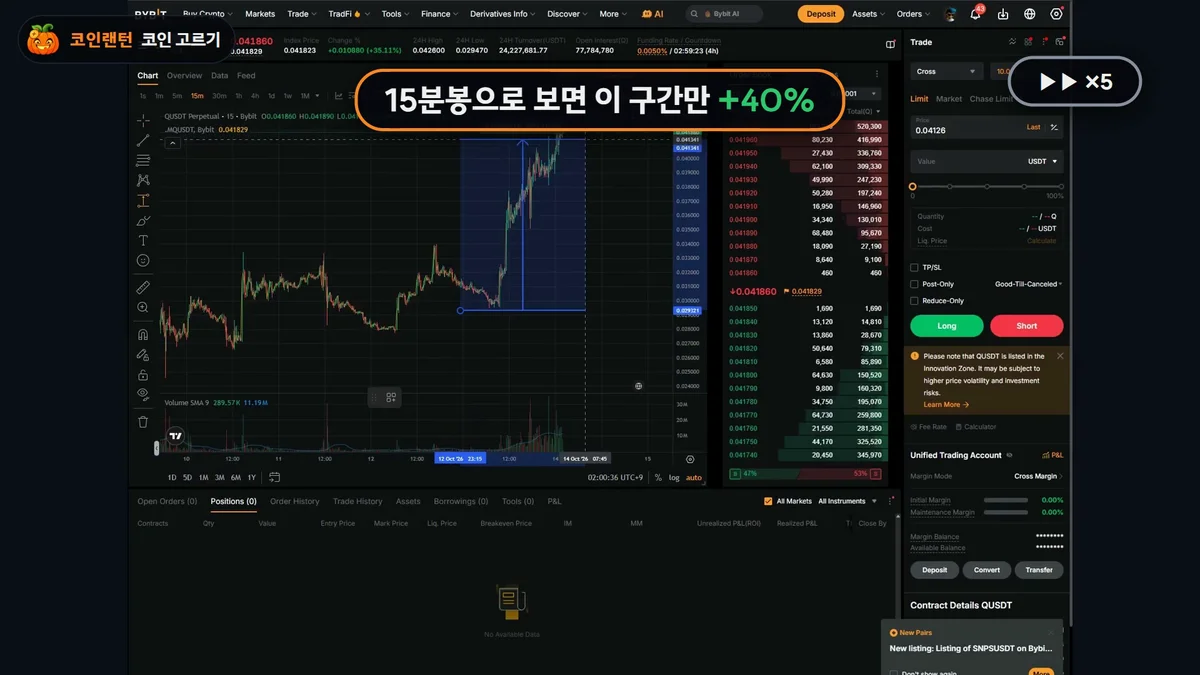
This isn't a tip to buy it. A coin that moves a lot also drops a lot. Your odds of winning and losing both go up.
Four prices in one candle
Before the program can decide anything, it needs prices. The easiest way is to pull candles.
Each bar on a chart is one candle. On a 15-minute chart, one bar is 15 minutes, and it holds four prices from that window.
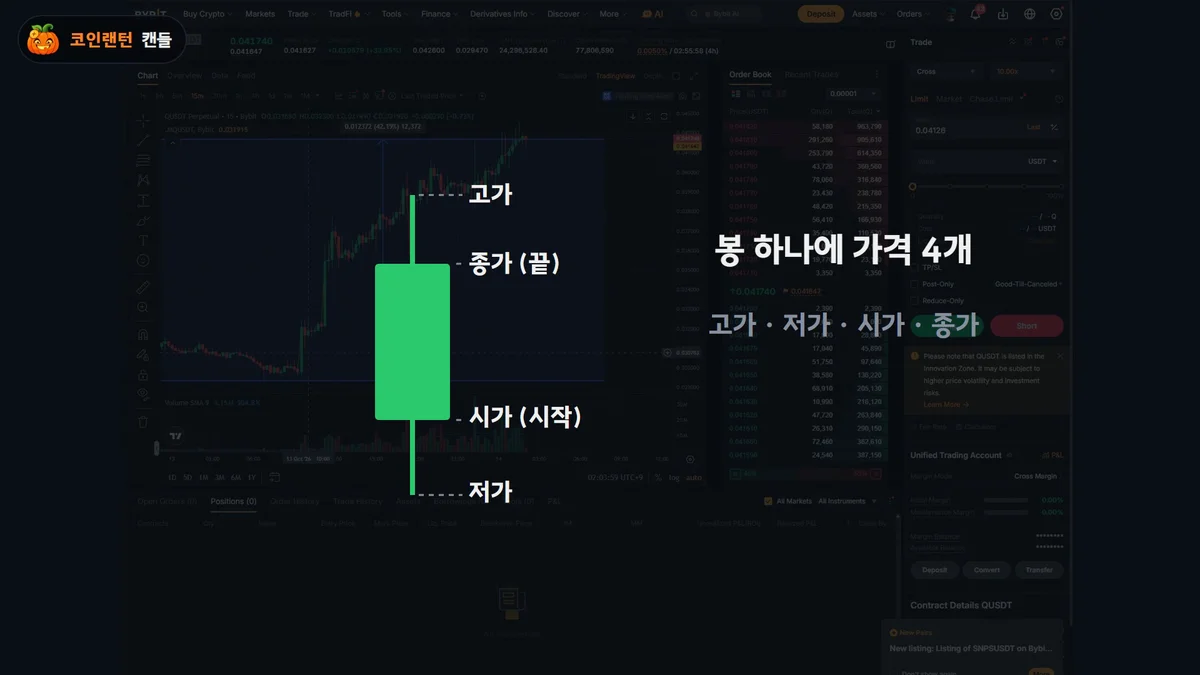
- Open: the price when the 15 minutes started
- Close: the price when the 15 minutes ended
- High and low: the highest and lowest prices during those 15 minutes
You can also get candles in 1-minute, 5-minute, 1-hour or 4-hour sizes. Since the rule is 3% per hour, 1-hour candles would work. I used 15-minute candles to check more often. Four of them make one hour.
First prompt, pull the candles
I opened the folder from Part 1 and kept going there.
Write code that pulls a day of QUSDT futures 15-minute candles from Bybit and shows them. Up to 1000 at a time.
I added "up to 1000 at a time" because Bybit returns at most 1000 candles per request. The AI wrote the code, ran it itself, and reported that it got 1000 candles.
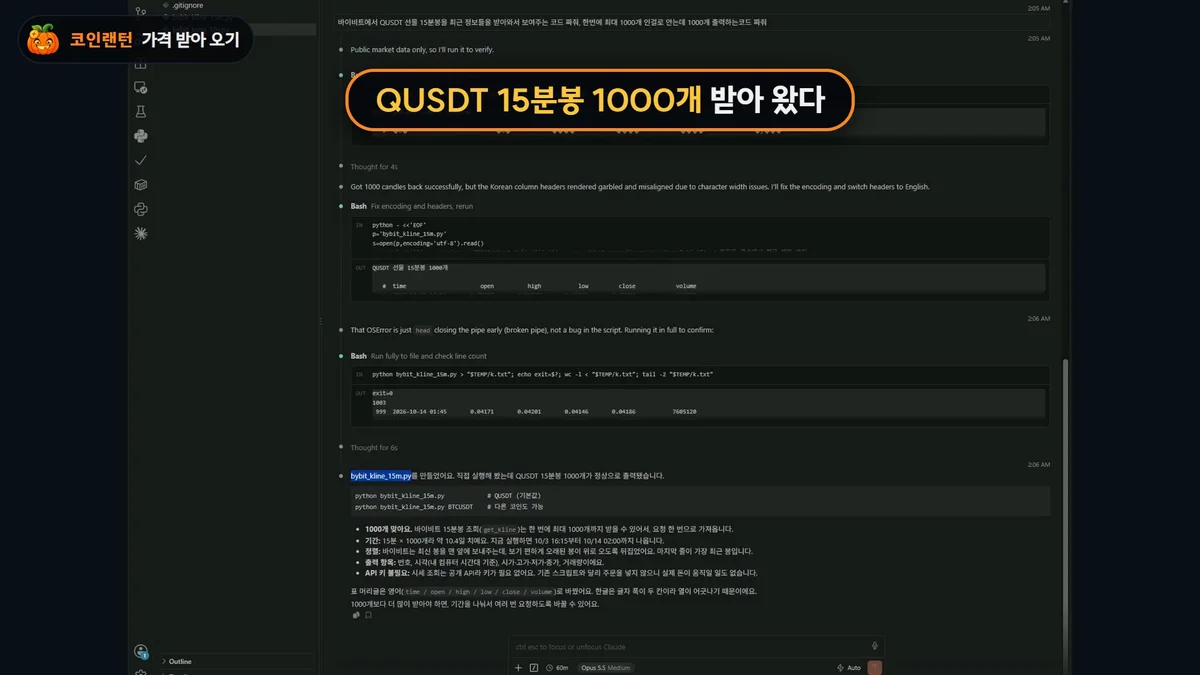
1000 fifteen-minute candles is a little over ten days. When you run it, rows of timestamps, the four prices and volume scroll by.
Check the numbers with a chart
Numbers alone don't tell you whether the data is right. So I asked for a chart.
Draw a chart from the data you pulled. I want to compare it with the real 15-minute chart.
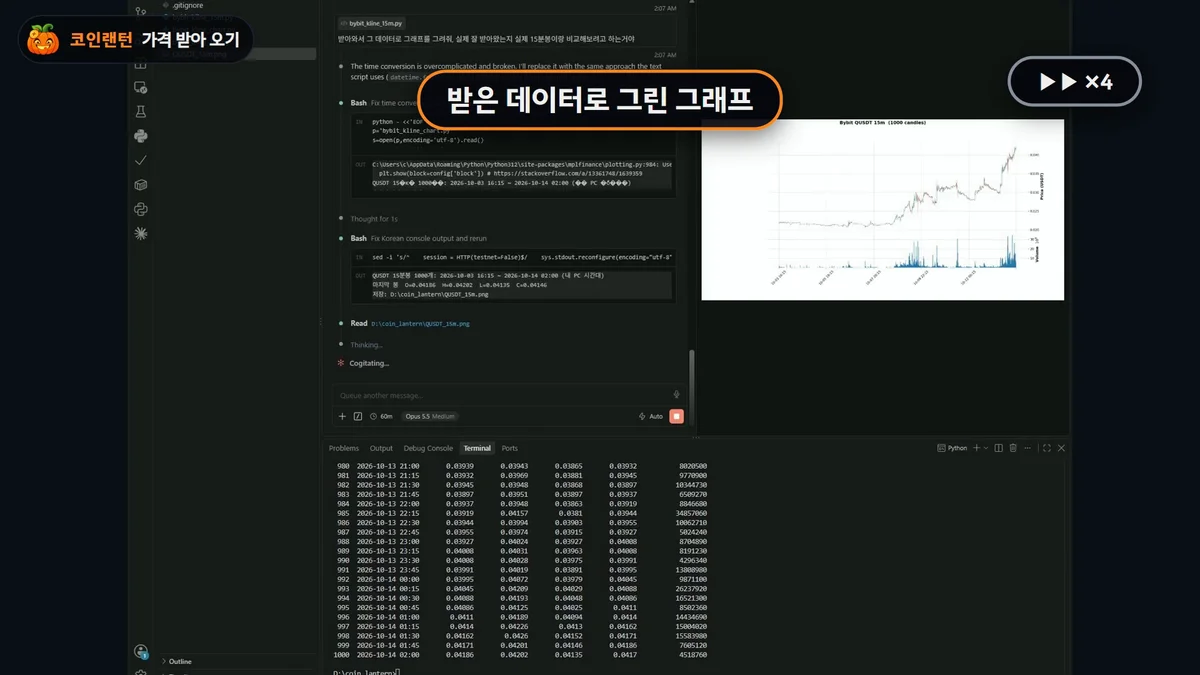
Side by side with Bybit's chart, the shape matched: flat, then up, a dip, and a long climb. Same data, just drawn differently.
You can skip this step. But it's reassuring to eyeball the data once the first time. If the time zone is off or the order is reversed, your rule gets calculated on the wrong numbers.
Write the rule in plain words
Now the program needs to pull this data regularly and trade when the rule is met. Here's what I wrote.
Every 15 minutes, pull QUSDT 15-minute candles. If it rose 3% or more over the last hour, enter long. After entry, close when it's 2% above the entry price, and stop out at a 5% loss. Make it object-oriented and keep it running continuously.
"Object-oriented" is a developer term. Think of it as giving each coin its own handler when you trade several. You can leave it out and the AI will still do a good job.
I added one more thing.
It's one coin for now, but make the program work with multiple coins that I choose.
That way, later you just add coin names to watch several at once.
Read what the AI built
When it was done, the AI ran a paper trade (a run that only pretends to place orders) and said everything worked. Two points in its explanation are worth noticing.
- It measures the 3% over four closed 15-minute candles, so one finished hour. The candle forming right now is still changing, so it isn't used
- While it holds a position, it won't enter the same coin again
I never asked for the second one. The AI added it on its own. Without it, a long would pile up every 15 minutes while the condition holds. It's safer to say it in your first prompt.
Running it for real, waiting at 0.36%
I didn't stop at paper trading. I ran it for real right away.
We're going to run it for real right now. Make it trade the minimum amount. Can you run it?
You can run it yourself, but if you ask the AI, it runs it for you. I hadn't built any screen, yet the AI printed the current status as text.
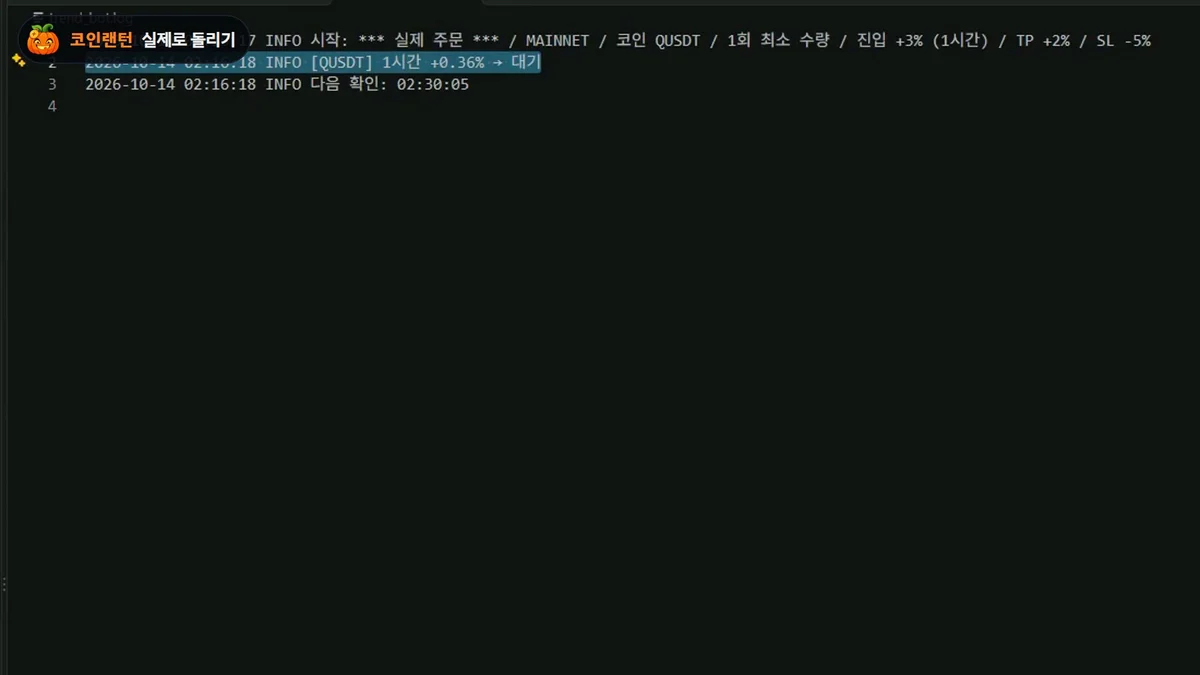
The first log line lists everything: real orders, the coin, minimum size per trade, entry +3%, take profit +2%, stop loss -5%. Before you run anything, check that this line matches what you asked for.
The next line is the current decision. Up 0.36% over the last hour, short of 3%, so it waits. The next check was at 2:30:05. The 15-minute candle closes at 2:30, so it looks again five seconds later.
Lowered to 0.3% for a test, and it entered
Who knows when a 3% hour comes again, so I lowered the condition for testing.
This is just a test, so change it to buy at 0.3% or more in an hour and run it again.
0.36% is above 0.3%, so a long went in right away.
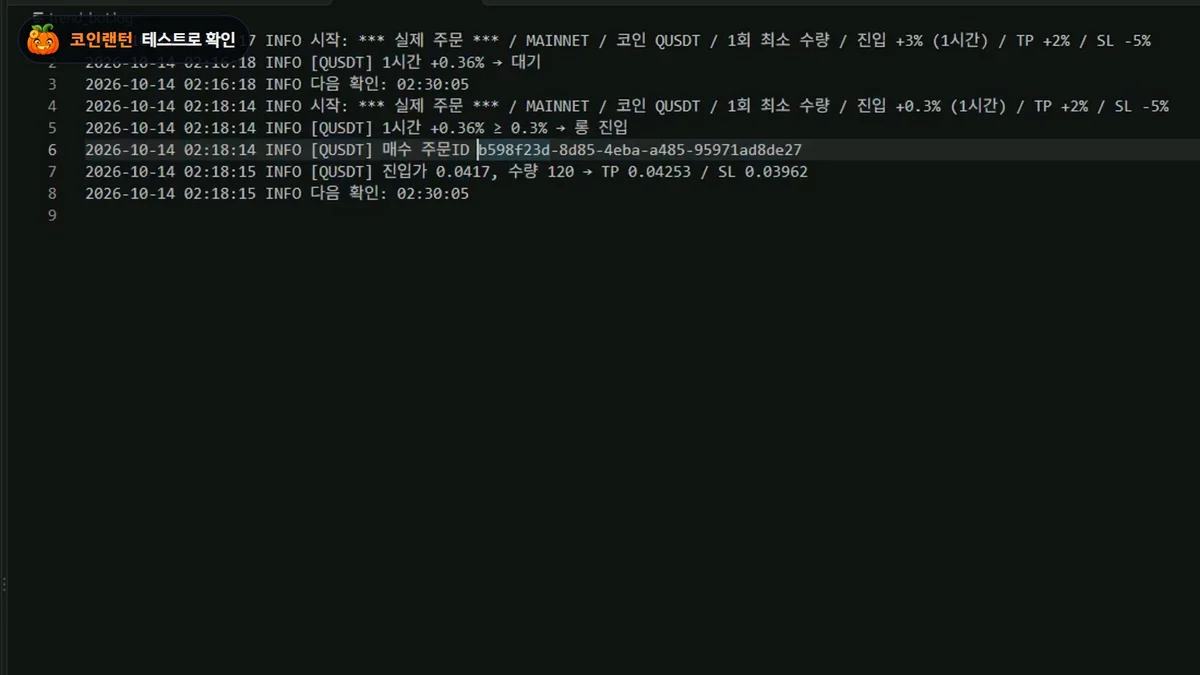
| Item | Value |
|---|---|
| Entry price | 0.0417 |
| Size | 120 coins (about 5 USDT, Bybit's minimum order value) |
| Take profit | 0.04253 (entry +2%) |
| Stop loss | 0.03962 (entry -5%) |
Two lines appeared on the Bybit chart too. The upper one is take profit (TP), the lower one stop loss (SL).
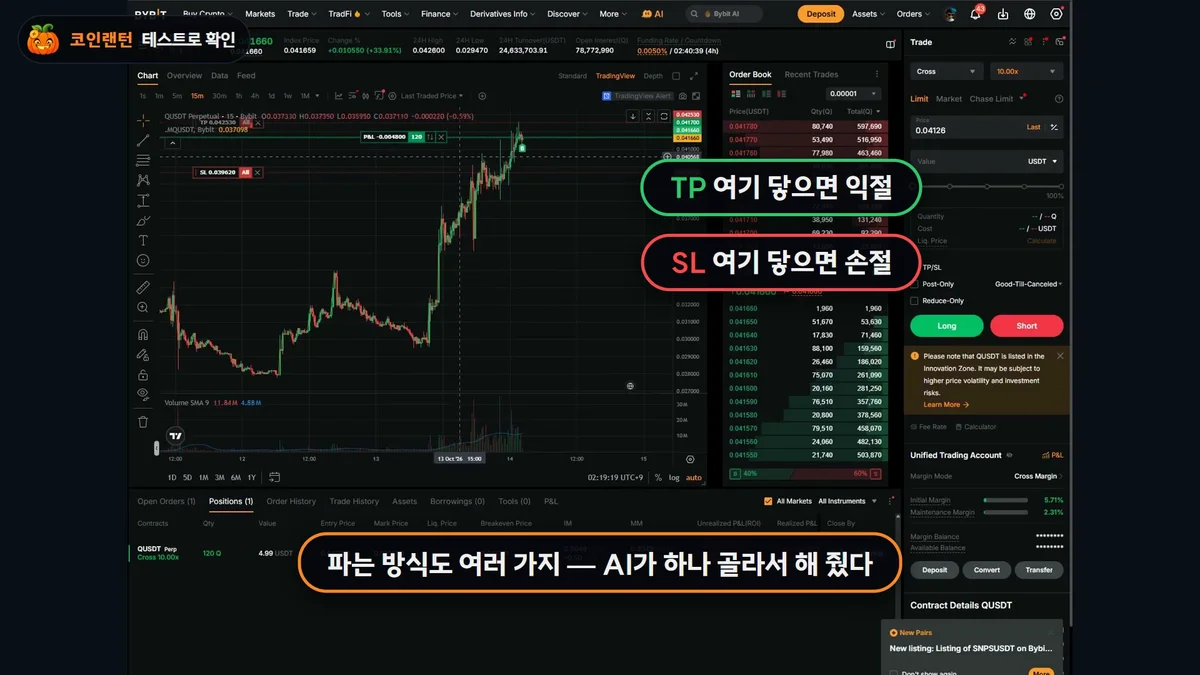
There are several ways to close a trade. The program could keep watching the price and send a close order itself. This time the AI chose to set take-profit and stop-loss prices on Bybit at entry. The exchange then closes the position the moment price touches either one. Even if the program stops for a while, those two lines stay on Bybit.
When the test is over, set 0.3% back to 3%. At 0.3%, most coins clear that easily in an hour and it will keep entering.
The trade didn't close while I was recording. A 2% rise or 5% drop within the hour doesn't come that fast.
It looks automated, but a lot is missing
At this point it feels like a trading bot, but plenty is missing.
- Turn off the computer or close the window and it stops. It has to stay on
- Restart the program and it forgets the entry it made. It could enter the same coin again
- A real program keeps a trade log and handles problems like rejected orders or a dropped connection
The AI is good at writing code that enters and exits on a rule. A program that runs for days without stopping is a different story. I'll fill those gaps one at a time in this series.
Next, watching every coin
Today I only watched QUSDT. But the coins that move most change every day. In the end you need to watch all of them.
Bybit has more than 700 futures coins. Today's method asks for candles one coin at a time, so that's 700 requests. For that, there's a way to get the current price of every coin in one go. It's a bit harder, and in the next part I'll use it to watch every Bybit futures coin.
Whether today's rule actually makes money is still unknown. I'll check that later by running a simulation on past data.
Nothing here is investment advice. Crypto is volatile, and past results don't guarantee future returns.